· Atanas Desev · Sitecore
Vercel Microfrontends on Sitecore XM Cloud: What Actually Breaks
A field report from a four-app, 21-locale XM Cloud build - the asset-prefix bug, the dead soft navigation, the redirect loop, and the fixes that shipped.
There is no shortage of guides on how to set up Vercel Microfrontends. Between the official documentation and a dozen blog posts you will find microfrontends.json explained, the withMicrofrontends helper, the path patterns and the local proxy. The setup really is close to that simple, and this post assumes you already have a group running.
What no guide puts in one place is what happens in week three, when a content editor asks why one of the product sites loads without fonts, or why clicking a link on the shell throws Failed to load static props into the console. Some of these are documented - in a troubleshooting page you only find once you know the symptom. Some are not. This post is the list in the order you will hit it.
This post is the other half. It is everything we hit taking a Drupal estate onto Sitecore XM Cloud with four Next.js applications behind one domain, and the code we wrote to fix each one. Every snippet here is from the production codebase.
The setup, in one paragraph
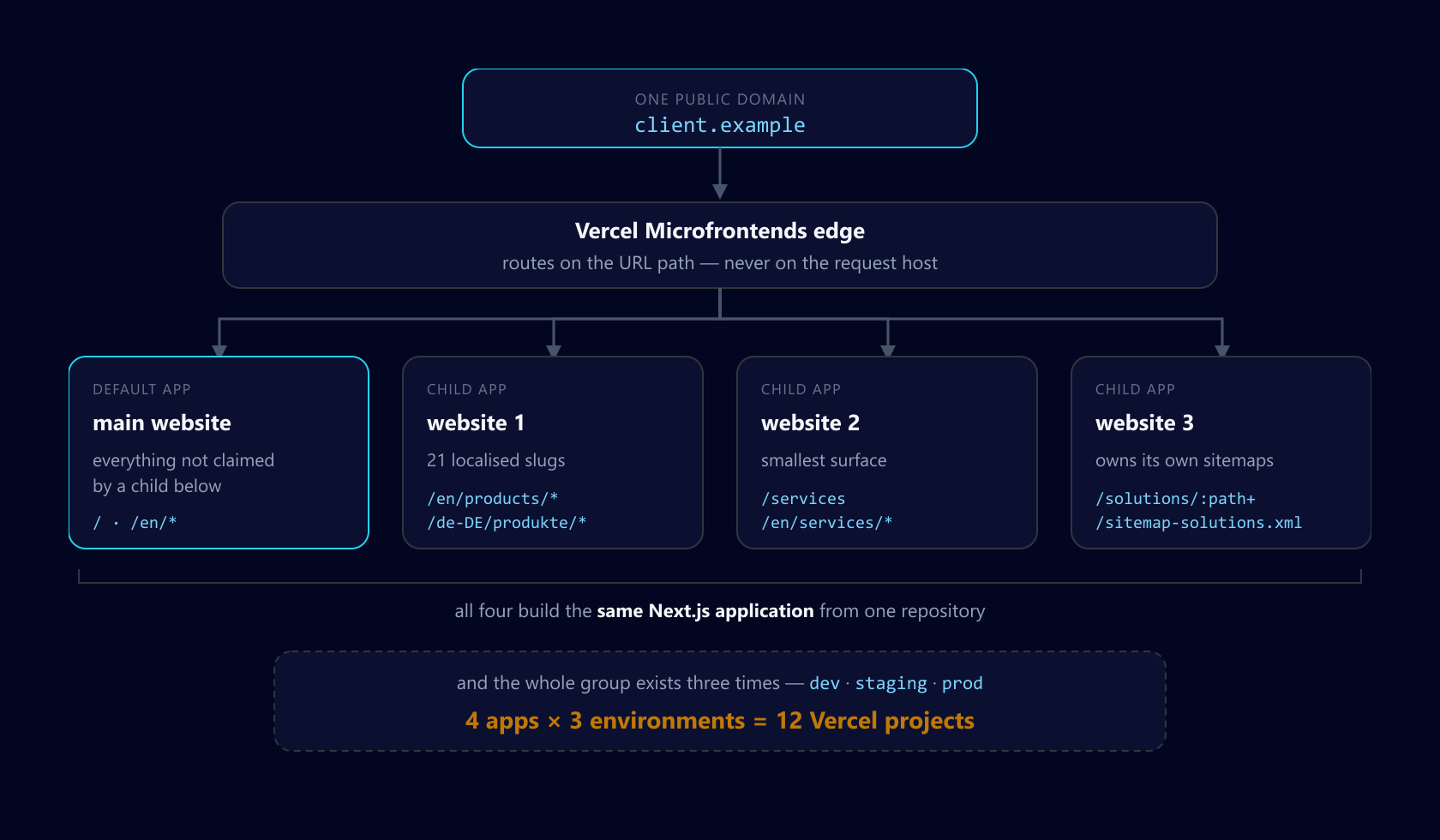
Our client runs several business divisions on one domain - a main corporate site plus three product sites, which this post calls website 1, website 2 and website 3 - across 21 locales. We migrated them from Drupal to Sitecore XM Cloud on Next.js 15 (Pages Router) with the Sitecore Content SDK, and split them into four Vercel projects joined by a Vercel Microfrontends group, so each division can deploy without waiting for the others.
One domain, routed on path to four applications - and the same group duplicated across three environments
What we will cover
Why the architecture is one codebase deployed four times, and why that matters more than it sounds
The
assetPrefixbug that breaks everything in/publicWhy client-side navigation breaks across zones, and the one config option that fixes it
The
?_df=1fallback loop, and the middleware matcher that causes it:path*versus:path+- the one-character bugWhy the request host does not tell you which app is handling the request
Sitecore-specific wiring: rendering hosts, editing host,
sites.jsonCommon mistakes, a pre-launch checklist, and an FAQ
1. One codebase, four projects
This is the decision everything else follows from, so it is worth being precise about it.
Vercel's documentation is layout-agnostic - monorepo and polyrepo work the same way - but the examples throughout assume genuinely different applications: a marketing app, a docs app, a dashboard app, each its own package. That is not our shape. All four of our Vercel projects build the same Next.js application from the same repository. The difference between them is which Sitecore site they resolve and which paths the group routes to them.
You can see it in the config. Here is the production group:
xm-cloud-app/microfrontends.prod.json
{
  "$schema": "https://openapi.vercel.sh/microfrontends.json",
  "applications": {
    "prod-main-website": {
      "development": { "fallback": "prod-shell.vercel.app" }
    },
    "prod-website-1": {
      "development": { "fallback": "prod-app1.vercel.app" },
      "routing": [
        {
          "paths": [
            "/en/products/:path*",
            "/de-DE/produkte/:path*",
            "/fr-FR/produits/:path*",
            "/nl-NL/producten/:path*",
            "/pl-PL/produkty/:path*",
            "/cs-CZ/produkty/:path*",
            "/hu-HU/termekek/:path*",
            "/bg-BG/produkti/:path*"
          ]
        }
      ]
    },
    "prod-website-2": {
      "development": { "fallback": "prod-app2.vercel.app" },
      "routing": [
        {
          "paths": [
            "/services",
            "/services/:path*",
            "/en/services/:path*",
            "/de-DE/dienstleistungen/:path*"
          ]
        }
      ]
    },
    "prod-website-3": {
      "packageName": "xm-cloud-app",
      "development": { "fallback": "prod-app3.client.example" },
      "routing": [
        {
          "paths": [
            "/sitemap-solutions.xml",
            "/sitemap-guides.xml",
            "/api/sitemap",
            "/solutions/:path+",
            "/en/solutions/:path*",
            "/de-DE/loesungen/:path*",
            "/it-CH/soluzioni/:path*",
            "/pl-PL/rozwiazania/:path*",
            "/sv-SE/losningar/:path*"
          ]
        }
      ]
    }
  }
}
(The real file lists all 21 locales per application. Truncated here for readability.)
Note "packageName": "xm-cloud-app" on prod-website-3. In our staging group, every application carries that same packageName, because they are all the same package. That is fine, and it has nothing to do with assets. packageName only maps an entry in microfrontends.json to the name in package.json, so the local development proxy (and the build-time lookup of the config) can match the app to its package. Asset prefixes come from the application name - the Vercel project name: /vc-ap-<hash of application name> as of the 2.0.0 release, /vc-ap-<application name> before it. Four distinct projects get four distinct prefixes, whatever their package is called.
We keep three parallel groups - dev, staging and prod - each with four projects, and a config file per environment:
xm-cloud-app/
├── microfrontends.json         # dev group
├── microfrontends.stage.json   # staging group
└── microfrontends.prod.json    # prod group
This is a supported pattern, not a hack: set VC_MICROFRONTENDS_CONFIG_FILE_NAME per environment and Vercel reads the right file. One repository can back several groups that way. If you use Turborepo, set the variable outside the turbo invocation so the local proxy picks it up:
VC_MICROFRONTENDS_CONFIG_FILE_NAME="microfrontends.stage.json" turbo devThat is twelve Vercel projects for one codebase. Hold that thought - it is the entire subject of part 2.
The alternative we rejected
Before the group existed, we wrote an internal guide for the other approach: one Vercel project, one domain, path-based site resolution done entirely in middleware, with resolveSiteNameFromPathname picking the Sitecore site. It works. It is cheaper. What it does not give you is independent deploys - and with four divisions on different release cadences, that was the requirement that won.
If your divisions ship together, do not reach for microfrontends. A single project with path-based site resolution in middleware is less machinery and fewer failure modes.
2. Turn it on without breaking local development
withMicrofrontends injects an assetPrefix and multi-zone routing that only make sense when Vercel's edge is in front of you. Run it locally and page routing breaks.
So the wrapper is conditional:
xm-cloud-app/next.config.ts
import { withMicrofrontends } from '@vercel/microfrontends/next/config';

const nextConfig: NextConfig = {
  // ... Sitecore, i18n, images, headers, redirects
};

// withMicrofrontends adds assetPrefix and multi-zone routing only needed on Vercel.
// Locally it breaks page routing; on DEV we run without microfrontends (Stage only).
// Set ENABLE_MICROFRONTENDS=true in Vercel project env vars for Stage/Production.
// supportPagesRouter is required for Pages Router apps - see section 4.
const useMicrofrontends = process.env.ENABLE_MICROFRONTENDS === 'true';

export default useMicrofrontends
  ? withMicrofrontends(nextConfig, { supportPagesRouter: true })
  : nextConfig;
This gives you a kill switch that needs no code change: unset ENABLE_MICROFRONTENDS in a Vercel project and that app stops participating. We have used it twice during incidents.
The trade-off is that you are now running a materially different configuration locally than in production, so the bugs in the next two sections are invisible until you deploy. Budget for that.
3. The assetPrefix bug: everything in /public breaks
Symptom. On the shell domain, website 3 and website 1 pages render with no custom fonts, missing favicons and broken media links. On the child domains, the same pages are fine.
Cause. withMicrofrontends gives each application an auto-generated asset prefix - an obfuscated hash of the project name, something like /vc-ap-f0ddc9. Next.js applies that prefix automatically to /_next/static/*. It does not apply it to anything else you reference from /public. So a component that hard-codes /assets/fonts/brandsans-bold.woff2 emits an unprefixed URL, the shell receives it, and the shell has no idea it belongs to the website 3 zone.
This is not a side effect of our one-codebase setup, and it is not undocumented. It hits every Next.js microfrontend: the prefix is per application, and only /_next/static picks it up automatically. Vercel says so in its routing docs JavaScript and CSS URLs are prefixed automatically, "but content in the public/ directory needs to be manually moved to a subdirectory with the name of the asset prefix."
Fix, the simple version. Stop relying on the hash. microfrontends.json lets you set a human-readable assetPrefix per application:
"prod-website-3": {
  "assetPrefix": "website-3-assets",
  "routing": [ /* your page paths */ ]
}
Then move that app's /public content under public/website-3-assets/ and reference it as /website-3-assets/fonts/brandsans-bold.woff2. Vercel's rule for /public is that assets must either be listed in the microfrontends config or live under a path carrying the application's asset prefix - the folder move satisfies the second, so no extra routing entry is needed. If assets still 404 after deploying, add "/website-3-assets/:path*" to that application's paths and retest; paths must map uniquely to one microfrontend, so don't add it speculatively.
The prefix is now a known constant, so the whole __NEXT_DATA__ / NEXT_PUBLIC_MFE_ASSET_PREFIX dance below goes away. With one codebase deployed as four projects, that means one subfolder per prefix. Vercel's caveat applies: changing an asset prefix is not guaranteed to be backwards compatible, so route the new prefix to the project in production before you set the assetPrefix field.
Fix, if you keep the auto-generated prefix. Never reference a /public path directly. Route every one through a helper:
xm-cloud-app/src/lib/mfe/public-asset-path.ts
/**
 * Resolve URLs for files in `/public` when Vercel Microfrontends sets `assetPrefix`
 * (e.g. `/vc-ap-f0ddc9`). `_next/static` is prefixed automatically; `/assets/*` and
 * root files like `/favicon-site3.png` are not unless we prefix them here.
 */
export function getMfeAssetPrefix(): string {
  if (typeof window !== 'undefined') {
    const prefix = (window as { __NEXT_DATA__?: { assetPrefix?: string } })
      .__NEXT_DATA__?.assetPrefix;
    return prefix ?? '';
  }
  return process.env.NEXT_PUBLIC_MFE_ASSET_PREFIX ?? '';
}

/** Strip an accidental locale segment (e.g. `/en/assets/foo` → `/assets/foo`). */
export function normalizePublicAssetPath(path: string): string {
  let normalized = path.startsWith('/') ? path : `/${path}`;
  if (/^\/[a-z]{2}(?:-[a-zA-Z]{2})?\/assets\//i.test(normalized)) {
    normalized = normalized.replace(/^\/[a-z]{2}(?:-[a-zA-Z]{2})?/i, '');
  }
  return normalized;
}

export function publicAssetPath(path: string): string {
  const normalized = normalizePublicAssetPath(path);
  return `${getMfeAssetPrefix()}${normalized}`;
}

/** Alias - use for all `/public` static file references. */
export const siteAssetPath = publicAssetPath;

/**
 * Same prefix rules - routes `/api/*` to the website 3 zone on the shell.
 * Prefer routing API paths explicitly in `microfrontends.json` (as we do for
 * `/api/sitemap`). Two mechanisms for one job is the drift problem in section 8.
 */
export function mfeApiPath(path: string): string {
  return publicAssetPath(path);
}
Three details are load-bearing:
Client side reads
__NEXT_DATA__.assetPrefix. With the auto-generated prefix, that is the only reliable place it appears at runtime - it is a hash of the project name, so you cannot guess it. With a fixedassetPrefix(above) you do not need this at all.Server side reads
NEXT_PUBLIC_MFE_ASSET_PREFIX. You set this per project in Vercel so server-rendered markup carries the right prefix on first paint. Get this wrong and you ship a hydration mismatch.normalizePublicAssetPathstrips a leading locale. Our middleware locale-prefixes aggressively, and/de-DE/assets/fonts/…is never a real file. This guard stops a 404 class we spent an afternoon on.
Then enforce it. A lint rule banning string literals starting /assets/ in JSX is worth writing on day one - we added ours after the third regression.
4. Soft navigation across zones needs Pages Router support
Symptom. Click any in-app link on the shell domain. The page half-navigates, the console shows Failed to load static props, and the network panel is full of red /_next/data/… 404s.
Cause. Next.js client-side navigation fetches /_next/data/{buildId}/<route>.json. Those requests go out without the zone's /vc-ap-* prefix. The shell receives a data request for a route it does not own, misses, and - because of our Drupal fallback - 307s to ?_df=1, at which point middleware proxies Drupal HTML in response to a request that expected JSON. Hence the error.
Worse, buildId differs per deployment, so any cross-zone soft navigation is asking one app for another app's build artefacts.
Fix. This is a documented failure mode, not something you have to engineer around. Vercel's microfrontends troubleshooting guide lists it as "Pages Router pages fail during client-side navigation" - /_next/data requests that 404 or route to the wrong microfrontend - and the fix is one option on the config wrapper you already have:
next.config.ts (every Pages Router app in the group - shell and children)
import { withMicrofrontends } from '@vercel/microfrontends/next/config';
import type { NextConfig } from 'next';

const nextConfig: NextConfig = {
  // ...existing config
};

export default withMicrofrontends(nextConfig, {
  supportPagesRouter: true,
});
With supportPagesRouter enabled, withMicrofrontends generates a build ID for child applications so Pages Router /_next/data requests route to the correct microfrontend, and switches Webpack to deterministic module and chunk IDs. That covers both halves of the cause above: the data request reaches the zone that owns the route, and it asks for a build that zone actually has.
Caveat. The option is incompatible with a manual generateBuildId. If your next.config sets one, remove it first - otherwise you cannot use supportPagesRouter.
What not to do. Our first attempt was a workaround: patch Router.prefetch before next/link loads, override global fetch to answer any /_next/data request with a fake { pageProps: {} }, and intercept link clicks to force full document loads on the shell. It stopped the white screens, but it is a workaround for a solved problem - and it silently breaks same-zone soft navigation too, because every data request on the shell gets the empty stub, not just the cross-zone ones. If you have something similar in place, delete it and enable the option instead.
Verify with Vercel's Pages Router QA checklist: direct loads, client-side navigation into a Pages Router page from another zone, getStaticProps and getServerSideProps pages, and the /_next/data requests in the network panel - on a Preview deployment, not just locally.
5. The ?_df=1 loop
During a phased migration you will have a fallback to the legacy platform. Ours: when getStaticProps finds no Sitecore route, it redirects to the same URL with ?_df=1, and middleware proxies the old Drupal host.
That interacts badly with microfrontends in two ways.
First, Drupal's bundled asset trees must be matched by middleware, or they fall through to the catch-all page route and loop:
xm-cloud-app/src/middleware.ts
export const config = {
  matcher: [
    '/',
    '/api/editing/:path*',
    /*
     * Drupal legacy asset trees must always run through middleware - including
     * `.svg` / `.css` / `.woff2` / etc. The catch-all exclusion below would
     * otherwise skip them, they hit `[[...path]]`, miss Sitecore, and 307 into
     * a `?_df=1` redirect loop (broken one legacy section).
     */
    '/themes/:path*',
    '/sites/:path*',
    '/modules/:path*',
    '/core/:path*',
    '/libraries/:path*',
    '/legacysection/:path*',
    '/((?!_next/static|_next/image|favicon\\.ico|.*\\.(?:svg|png|jpg|jpeg|gif|webp|ico|woff2?|ttf|eot|css|map)$).*)',
  ],
};
We lost most of a day to legacy-section pages before spotting that the generic extension exclusion was swallowing the Drupal asset paths.
Second, the fallback must strip _df before redirecting, or the retry carries it forward and loops again:
if (req.nextUrl.searchParams.has('_df')) {
  const cleanUrl = req.nextUrl.clone();
  cleanUrl.searchParams.delete('_df');
  // …redirect to the canonical localized path; the edge forwards the retry
  // to the correct child app.
}
The general lesson: any redirect your app performs gets re-evaluated by microfrontend routing. A redirect that was safe on a single project can become a loop the moment a group is in front of it.
6. :path* versus :path+
One character, real outage. Look at the website 3 routing again - /solutions is that site's section root:
"paths": [
  "/solutions/:path+",
  "/en/solutions/:path*"
]
:path* matches zero or more segments, so /solutions itself matches. :path+ matches one or more, so /solutions does not.
We need /solutions/:path+ because the bare /solutions root is handled by the shell's localized redirect logic, not the website 3 child. Route it to the child and you get a redirect ping-pong between the two.
It cuts both ways: if the child should own its section root, :path* is the correct pattern and :path+ will give you a 404 on a page that exists. Either way the rule is the same - decide explicitly who owns the section root, then write the pattern that says so.
7. The request host does not tell you which app is serving
This one is genuinely counter-intuitive, and it is the mental model most likely to send you down a wrong path.
Microfrontend routing is path-based and applies uniformly across every domain in the group. A request for /en/solutions/foo goes to the website 3 child whether it arrived on the shell domain, a child domain, or a preview URL. The host does not select the app.
But the host still matters, for two reasons: child domains are internal Sitecore rendering hosts that must not be indexed, and when the edge sends an unmatched path to the default app from a child host, you need to know that to redirect sensibly.
xm-cloud-app/src/lib/routing/host.ts
export type HostSite = 'site1' | 'site2' | 'site3' | 'shell';

export function classifyHost(host: string | null | undefined): HostSite {
  if (!host) return 'shell';
  const normalized = host.toLowerCase().trim().split(':')[0];
  if (!normalized) return 'shell';
  if (!normalized.endsWith('.client.example')) return 'shell';

  // 'stage-app3.client.example' → ['stage', 'app3']
  // 'stage-shell.client.example' → no vertical marker → shell
  const parts = normalized.replace(/\.client\.example$/, '').split('-');
  if (parts.includes('app1')) return 'site1';
  if (parts.includes('app2')) return 'site2';
  if (parts.includes('app3')) return 'site3';

  return 'shell';
}

export function isChildHost(host: string | null | undefined): boolean {
  return classifyHost(host) !== 'shell';
}
Two deliberate choices. Matching on hyphen-delimited components rather than substrings avoids a future app1-landing.client.example false-positive. And preview deployments, *.vercel.app and localhost all return 'shell', so host-aware logic is a no-op on them - you do not want redirect behaviour that only reproduces on preview URLs.
The host-aware redirect itself sits behind an environment kill switch, because it is the kind of logic that fails in ways you want to disable at 11pm without a deploy:
/**
 * Default: ON. Set `ENABLE_HOST_AWARE_REDIRECT=false` in the Vercel project env
 * vars to disable as a kill switch - no redeploy needed.
 */
const ENABLE_HOST_AWARE_REDIRECT = process.env.ENABLE_HOST_AWARE_REDIRECT !== 'false';
8. Two sources of truth, kept in sync by hand
microfrontends.json tells Vercel's edge which paths belong to which app. Your application also needs to know which path segment maps to which Sitecore site - for link generation, the language switcher, canonical URLs and site resolution.
We keep that in src/config/site-routing.ts, and the file says so at the top:
/**
 * Mirrors `microfrontends.json` in this same app. The two MUST be updated
 * together: routes added/changed in `microfrontends.json` must also be
 * reflected here.
 */
A comment is not a mechanism. If we were starting again we would generate microfrontends.json from the TypeScript config at build time, so there is one source and the drift cannot happen. (We have the pieces - src/lib/sitecore-resolver.ts already derives routing paths from Sitecore site definitions for exactly this purpose.) Adding a new locale means touching three config files plus Sitecore; that is three chances to forget one.
9. The Sitecore XM Cloud side
Most microfrontend content skips this, so to be concrete:
Each child app needs its own rendering host in Sitecore. Editors work in Pages against a specific app, so the child's own domain - not the shell - goes in the rendering host definition:
authoring/items/apikey/Services/Rendering Hosts/website-3.yml
ServerSideRenderingEngineApplicationUrl: https://prod-app3.client.example/
ServerSideRenderingEngineConfigUrl: https://prod-app3.client.example/api/editing/config
ServerSideRenderingEngineEndpointUrl: https://prod-app3.client.example/api/editing/render
This is the reason the child domains exist at all. Public traffic never needs them; Pages does.
Editing routes must never be cached or 304'd. A 304 omits Set-Cookie, which breaks preview mode:
xm-cloud-app/next.config.ts
// Sitecore Pages - must never 304 (304 omits Set-Cookie / preview mode breaks).
{
  source: '/api/editing/:path*',
  headers: [
    { key: 'Cache-Control', value: 'private, no-store, no-cache, must-revalidate' },
    { key: 'CDN-Cache-Control', value: 'no-store' },
  ],
},
sites.json must list every site. It is generated by the Content SDK build (sitecore-tools project build) and imported directly into middleware. If a site is missing from XM Cloud's site definitions, middleware cannot resolve it regardless of what the microfrontends config says.
Deploy the group together the first time. The edge resolves routing from the production deployment of the default app's config file. A child deployed before the shell knows about it is a child nothing routes to.
Common mistakes
Referencing
/publicfiles directly. Anything not under_next/staticneeds to live under a fixedassetPrefixfolder or go through the asset-prefix helper. Lint for it.Forgetting
NEXT_PUBLIC_MFE_ASSET_PREFIXon the server side (helper approach only). You get a hydration mismatch that looks like a React bug.Hand-rolling a soft-navigation workaround. Patching
Router.prefetchor stubbing/_next/dataresponses breaks same-zone navigation too. EnablesupportPagesRouterinwithMicrofrontends()instead - and drop any manualgenerateBuildId, which it cannot coexist with.Patching shell behaviour on child hosts. Guard every shell-only patch with
isChildHost.Assuming the host picks the app. It does not. Routing is path-based across the whole group.
Letting a generic file-extension exclusion into the middleware matcher while you still proxy a legacy platform.
Using
:path*where you meant:path+. Decide who owns the section root.Editing
microfrontends.jsonwithout editing your in-app route config. Or better: generate one from the other.Testing only on child domains. Almost every bug in this post reproduces on the shell and nowhere else.
FAQ
01.Do microfrontends work with the Sitecore Content SDK?Yes. There is no integration between them - the SDK does not know the group exists. All the friction is between Next.js and the edge routing layer, which is why the fixes here are Next.js-level rather than Sitecore-level.
Yes. There is no integration between them - the SDK does not know the group exists. All the friction is between Next.js and the edge routing layer, which is why the fixes here are Next.js-level rather than Sitecore-level.
02.Can the child apps share components?In our case they are the same codebase, so trivially yes. If your apps are genuinely separate packages you are back to a shared component library and the versioning that comes with it - microfrontends do not solve that problem.
In our case they are the same codebase, so trivially yes. If your apps are genuinely separate packages you are back to a shared component library and the versioning that comes with it - microfrontends do not solve that problem.
03.Does the shell need to know about the children at runtime?For routing, no - the edge handles it. For links, yes: the shell renders navigation pointing into child sections, which is why in-app route config has to mirror the microfrontends config.
For routing, no - the edge handles it. For links, yes: the shell renders navigation pointing into child sections, which is why in-app route config has to mirror the microfrontends config.
04.What happens on a preview deployment?Preview and branch URLs are routed by the group. Vercel resolves each project independently: a deployment URL routes to a deployment from the same commit, falling back to the branch deployment captured when the URL was created, then to the group's configured fallback environment. A branch URL routes to the latest deployment on that branch, with the same fallback.
So preview does reproduce shell behaviour - provided the fallback is configured. If a project in the group has no deployment to fall back to, you get MICROFRONTENDS_MISSING_FALLBACK_ERROR on the request rather than a working page. Check the Fallback Environment setting on the group before you rely on preview for QA.
Preview and branch URLs are routed by the group. Vercel resolves each project independently: a deployment URL routes to a deployment from the same commit, falling back to the branch deployment captured when the URL was created, then to the group's configured fallback environment. A branch URL routes to the latest deployment on that branch, with the same fallback.
So preview does reproduce shell behaviour - provided the fallback is configured. If a project in the group has no deployment to fall back to, you get MICROFRONTENDS_MISSING_FALLBACK_ERROR on the request rather than a working page. Check the Fallback Environment setting on the group before you rely on preview for QA.
05.Is localProxyPort worth setting up?For running the whole group locally, yes. We mostly do not - we run one app with ENABLE_MICROFRONTENDS unset and test group behaviour on staging, because local proxying does not reproduce the asset-prefix behaviour that causes most of our bugs anyway.
For running the whole group locally, yes. We mostly do not - we run one app with ENABLE_MICROFRONTENDS unset and test group behaviour on staging, because local proxying does not reproduce the asset-prefix behaviour that causes most of our bugs anyway.
06.How do you handle SEO across the split?Canonical URLs always point at the shell domain. Child domains are noindex. Sitemaps are generated per site and routed to the owning child (note /sitemap-solutions.xml in the website 3 paths above).
Canonical URLs always point at the shell domain. Child domains are noindex. Sitemaps are generated per site and routed to the owning child (note /sitemap-solutions.xml in the website 3 paths above).
07.Does this affect Sitecore Personalize or CDP?Not directly - those run client-side and see one domain. Do check that your assetPrefix handling does not break the script URL if you self-host any of it.
Not directly - those run client-side and see one domain. Do check that your assetPrefix handling does not break the script URL if you self-host any of it.
08.What about analytics across zones?Navigation between zones is a full document load, so every cross-zone navigation is a real page view. That is actually simpler than the SPA case, but it does change your numbers if you migrate from a single-app setup - expect page-view counts to move.
Navigation between zones is a full document load, so every cross-zone navigation is a real page view. That is actually simpler than the SPA case, but it does change your numbers if you migrate from a single-app setup - expect page-view counts to move.
09.Is it worth it?If your divisions genuinely deploy independently, yes. If they do not, you are paying real complexity - and, as part 2 covers, real money - for autonomy nobody is using.
If your divisions genuinely deploy independently, yes. If they do not, you are paying real complexity - and, as part 2 covers, real money - for autonomy nobody is using.
Pre-launch checklist
Every
/publicreference lives under a fixedassetPrefixfolder, or goes throughpublicAssetPath()If you use the auto-generated prefix:
NEXT_PUBLIC_MFE_ASSET_PREFIXset per project, matching the deployed prefixsupportPagesRouter: trueinwithMicrofrontends()for every Pages Router app, and no manualgenerateBuildIdCross-zone links verified on the shell domain and on a Preview deployment, not just child domains
Fallback Environment configured on the group, so preview URLs resolve every project
Console clean of
/_next/data404s on the shellSection roots (
/solutions,/services) resolve without a redirect loopChild domains return
noindexRendering hosts in Sitecore point at child domains; Pages editing works per site
/api/editing/*returnsno-store, never 304sites.jsonlists every site after the Content SDK buildENABLE_MICROFRONTENDSandENABLE_HOST_AWARE_REDIRECTkill switches testedRouting paths in
microfrontends.jsonand in-app config diffedLegacy-platform fallback tested for every proxied asset tree
What is coming in part 2
Everything above is about getting it to work. The second half of this story is what it costs to run.
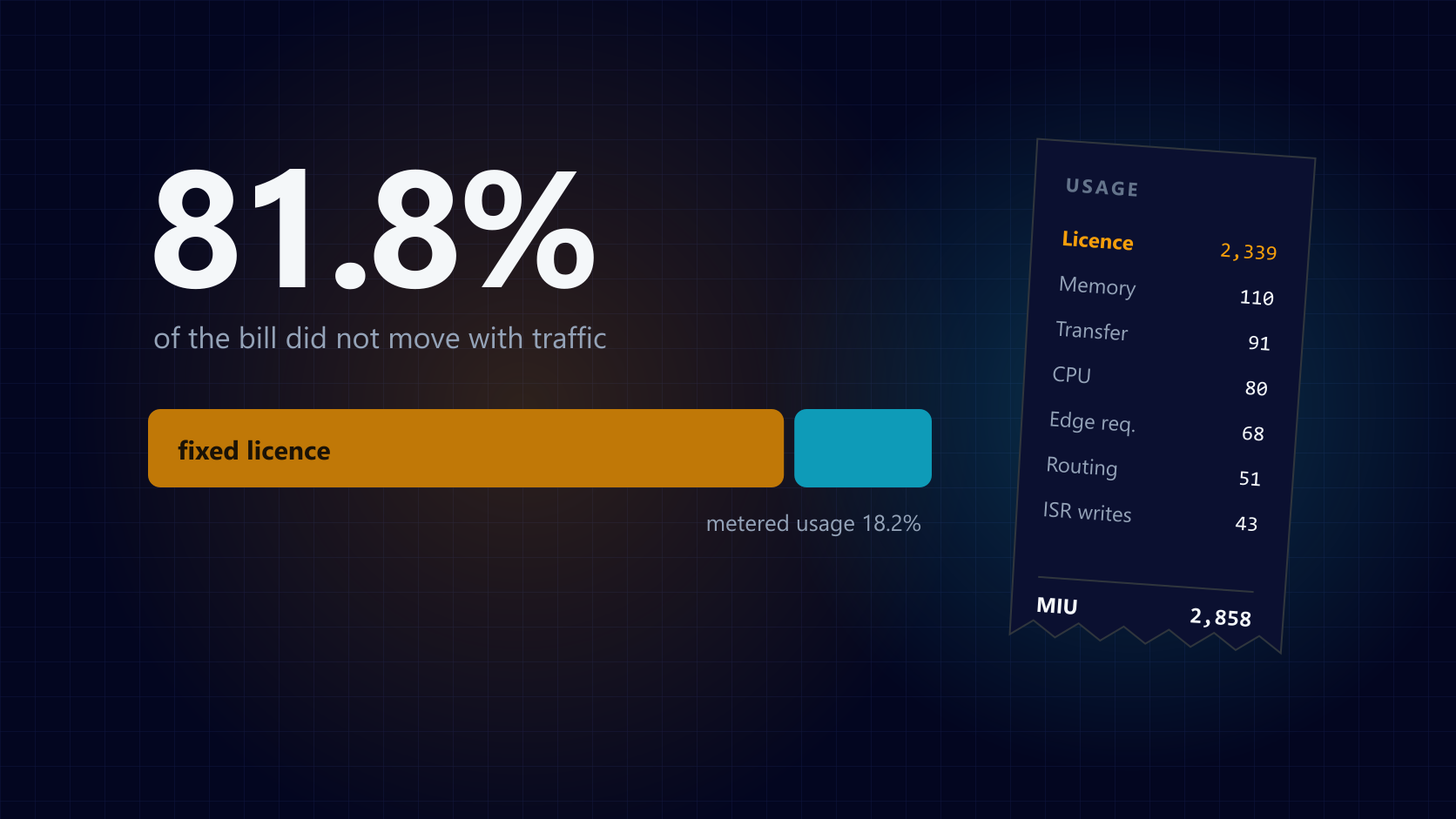
When we audited the Vercel bill on this project, 81.8% of it turned out to be a single line item that had nothing to do with traffic - and most of that was spent on environments no customer ever visits. Part 2 covers how Vercel meters a microfrontend group, the non-production licence trap, how to read your own usage page properly, and what 21 locales do to your ISR write volume.
Part 2 of 2: What Vercel Microfrontends Actually Cost
How Vercel meters a microfrontend group, the non-production licence trap, and what 21 locales do to your ISR write volume.
Final thoughts
Vercel Microfrontends does what it says: four teams, four deploy pipelines, one domain. The setup really is a config file and a wrapper function.
The cost is that you have introduced a routing layer between the browser and your application, and Next.js was not designed with it in mind. Asset prefixing, client-side data fetching and redirects all behave differently - and the differences only appear on the shell domain, in production. Every fix in this post is a workaround at the boundary between the two systems, not a Sitecore problem or a Next.js problem.
Go in knowing that, budget for the boundary work, and it is a sound architecture. Go in expecting the config file to be the whole job and you will find these bugs the way we did.
Moving an existing JSS application onto the Content SDK is its own piece of work. We wrote up what it involves: Sitecore JSS to Content SDK migration.