
· Asen Nikolov
Best practices and specifics in query optimization with EFCore in .NET applications.
A backend engineer's playbook for eliminating memory bloat, optimizing LINQ, and scaling data access.
The Reality of ORMs at Scale
Entity Framework Core often feels like a superpower when you first implement it. The clean abstractions and intuitive LINQ syntax make querying a breeze, allowing you to ship features rapidly. However, pushing those default settings into a production environment with heavy user traffic often leads to severe bottlenecks. Memory spikes, thread starvation, and an overwhelmed database engine become daily struggles.
It is easy to point fingers at the ORM or abandon it entirely for raw SQL micro-ORMs. Instead, recognize that EF Core is highly optimized—if you configure it for scale rather than rapid prototyping. The default behaviors prioritize developer ease, not high-performance execution.
To achieve production-grade speed, you must strip away unnecessary tracking, strictly shape your data payloads, and enforce strict execution boundaries. This guide covers the exact strategies to reduce memory footprint, optimize relational queries, and keep your application responsive.
1. Shedding Memory Weight and Trimming Payloads
Your application server is not a database replica. The primary goal here is to minimize the data traveling across the network and prevent EF Core from caching objects unnecessarily.
1.1 When you retrieve data using EF Core, it automatically keeps an eye on the state of every single entity. This is great for making SaveChanges() work flawlessly, but if you’re just reading data—like for a dashboard or a public API—this constant behind-the-scenes tracking eats up a massive amount of RAM and CPU for absolutely no reason.
We fix this by simply adding .AsNoTracking() to your queries to skip the tracking process entirely and instantly free up resources.
The more advanced option if you’re querying complex, heavily related data where multiple child objects point back to the same parent, use .AsNoTrackingWithIdentityResolution() instead. This gives you the performance boost while keeping your app from accidentally duplicating data in memory.
High memory consumption:
var inventory = await dbContext.Products.ToListAsync();Highly optimized for read-only scenarios:
var optimizedInventory = await dbContext.Products
    .AsNoTracking()
    .ToListAsync();
1.2. Eradicate the SELECT * Anti-Pattern
Fetching a 50-column database row just to display a title and an ID is disastrous for performance. It bloats the network payload and forces the ORM to map properties you will never use.
We solve the problem by enforcing strict projections using .Select(). By mapping directly to your DTOs in the LINQ query, EF Core translates this into a highly optimized, column-specific SQL query.
var catalog = await dbContext.Products
    .Select(p => new ProductDto
    {
        Id = p.Id,
        Title = p.Title,
        Price = p.Price
    })
    .ToListAsync();
When retrieving a single entity by its primary key, .FirstOrDefaultAsync(x => x.Id == 1) will always trigger a physical round-trip to the database engine.
We solve this by utilizing .FindAsync(). This acts as a primary key interceptor that checks the DbContext's local memory first. If the entity was already materialized during the current request scope, it returns immediately without a network call.
Bypasses cache, hits the DB immediately.
var user = await dbContext.Users.FirstOrDefaultAsync(u => u.Id == 99);Checks the local state manager first, falls back to DB if missing
var user = await dbContext.Users.FindAsync(99);2.Mastering Relational Queries
Fetching a single table is straightforward; efficiently fetching complex, interconnected data is where enterprise applications often fail.
2.1 Managing the N+1 Query Problem
The notorious N+1 issue occurs when you query a list of records and then unknowingly trigger a separate database query for each record's child entities within a loop. Fifty parents mean fifty-one database calls. In a local development environment with near-zero network latency, this inefficiency often goes unnoticed. However, once deployed to production, the cumulative delay of these sequential round-trips quickly snowballs, exhausting the database connection pool and severely degrading application response times.
We prevent multiple database calls by retrieving all related data upfront in a single round-trip. You can achieve this by using .Include() for eager loading, or by explicitly mapping the required relationships directly within your .Select() projection.
var authorsAndBooks = await dbContext.Authors
    .Include(a => a.Books)
    .ToListAsync();
2.2 Precision Joins with Filtered Includes
Older versions of EF Core forced you to retrieve all child records when using .Include(). If a customer had thousands of historical orders, you had to load every single one just to access the most recent entry. You can now apply LINQ operators directly within the include block to scope the SQL JOIN down to the exact subset of data you actually need. By executing filters like .where() or sorting operations before the data crosses the network, the database engine does the heavy lifting, which drastically reduces your application's memory footprint and prevents the expensive materialization of irrelevant records.
var customerDashboard = await dbContext.Customers
    .Include(c => c.Orders
        .Where(o => o.Status == "Processing")
        .OrderByDescending(o => o.OrderDate)
        .Take(5))
    .ToListAsync();
2.3 Mitigating Cartesian Explosions
Chaining multiple .Include() statements for different collection properties forces the database to combine all those tables using standard JOIN operations. This generates a massive, highly duplicated result set known as a Cartesian explosion, which inflates the network payload and can quickly exhaust both database memory and application server resources. You can mitigate this by appending .AsSplitQuery() to your query chain. Instead of transferring one giant, redundant grid of data over the wire, EF Core will execute multiple smaller, optimized SQL queries—one for the root entity and one for each included collection—and seamlessly stitch the complete object graph back together in the application's memory.
var complexOrder = await dbContext.Orders
    .Include(o => o.LineItems)
    .Include(o => o.ShippingDetails)
    .Include(o => o.PaymentTransactions)
    .AsSplitQuery() // Prevents massive data duplication over the wire
    .FirstOrDefaultAsync(o => o.Id == orderId);
3. Securing the Execution Pipeline
Ensure your C# logic evaluates on the database engine, and your web server threads remain available to handle traffic.
3.1 Block Silent Client-Side Evaluation
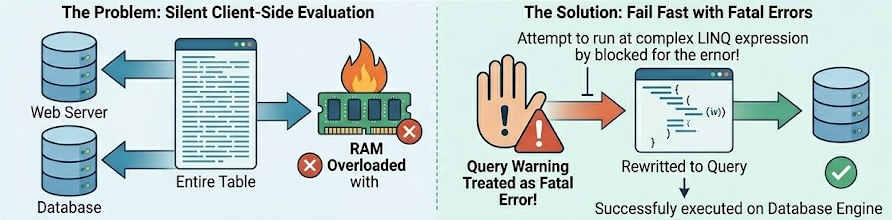
If EF Core cannot translate a complex LINQ expression into SQL—often because you included a custom C# method or an unsupported string formatting operation inside your filter—older configurations might quietly pull the entire table into RAM and process it locally. This silent fallback is a ticking time bomb that will inevitably crash a production server with an out-of-memory exception once your dataset grows.
While modern versions of EF Core strictly throw exceptions for root-level client-side evaluation, it is still critical to aggressively lock down your execution pipeline. Other sneaky relational warnings, such as implicit type conversions or unintended collection includes, can still bypass this protection and trigger inefficient local processing. By configuring your database context to treat these specific warnings as fatal application errors during local development, you force your engineering team to rewrite non-translatable queries before they ever have the chance to silently degrade performance in production. The Solution is to configure your DbContext to treat specific query warnings as fatal application errors during development, forcing you to rewrite non-translatable queries.
protected override void OnConfiguring(DbContextOptionsBuilder optionsBuilder)
{
    optionsBuilder
        .UseSqlServer(connectionString)
        .ConfigureWarnings(warnings =>
            warnings.Throw(RelationalEventId.MultipleCollectionIncludeWarning));
}
3.2: Unblock the Thread Pool
Synchronous materialization methods (.ToList(), ToArray()) block the executing thread while waiting on network and database I/O. Under heavy load, the .NET thread pool exhausts itself, causing requests to queue and time out.
In a local development environment, this blocking behavior is completely invisible. In production, it is a primary cause of catastrophic failure known as Thread Pool Starvation.
ASP.NET Core relies on a finite pool of worker threads. When you execute a synchronous query, the thread handling that user's request sits entirely idle, locked while waiting for the database engine to reply. A sudden burst of concurrent traffic will quickly hijack every available thread in the pool. With no threads left to "answer the door" for new requests, the server queue fills up and collapses into 503 Service Unavailable errors.
By strictly enforcing async/await and using .ToListAsync(), you shift this architecture. The moment the query hits the network, .NET immediately releases the worker thread back to the pool to handle other incoming traffic. Once the database finishes its work, a free thread picks up the response, unlocking massive concurrency without requiring you to upgrade your server hardware.
var activeUsers = await dbContext.Users
    .Where(u => u.IsActive)
    .ToListAsync();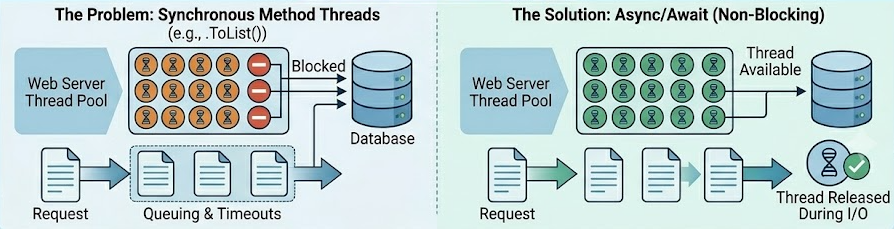
Optimizing Entity Framework Core in a production .NET environment requires shifting your mindset from initial convenience to long-term precision. By proactively bypassing the Change Tracker for read-only operations, strictly projecting payloads directly into DTOs, and actively defusing N+1 query traps, you can drastically reduce memory consumption and database round-trips.
The default behaviors in EF Core are designed to get your application off the ground quickly, but true scalability demands that you take deliberate control of the query execution pipeline. Implement these practices consistently, configure your context to hard-fail on client-side evaluations, and enforce asynchronous execution across the board. The result will be a robust, highly performant backend that scales efficiently and keeps your database out of the bottleneck zone.